Newsletter
Join the Community
Subscribe to our newsletter for the latest news and updates
macOS display scaling / virtual screens / PIP
Best for Mac users who will stay on Free / the 14-day trial while they add a first Virtual 16:9 — then Pro at US$21
Verified 23 Oct 2026 · Asia/Shanghai
Pricing. Free — $0 for non-business after trial (free features).
Decide
Full notes below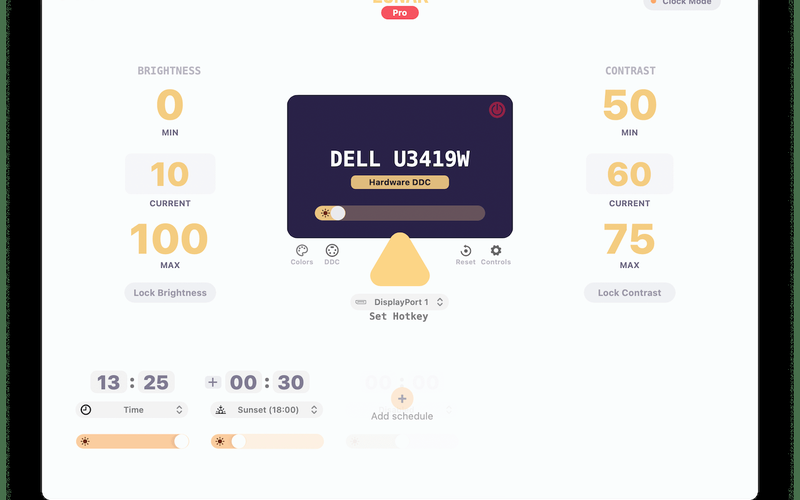
macOS monitor brightness/DDC desk
Best for Productivity · Open-source / Self-host
Mac input customization
Best for Productivity
macOS menu-bar system monitor
Best for Productivity · Open-source / Self-host
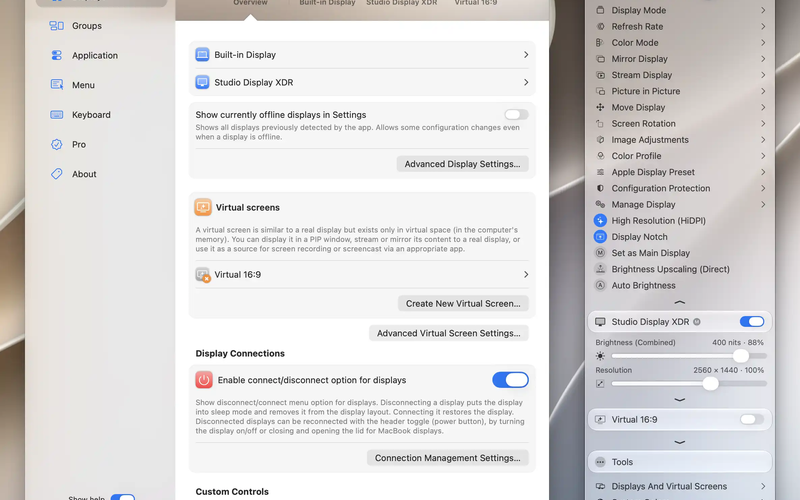
BetterDisplay is a macOS display-configuration desk: you open Settings on Built-in Display / Studio Display XDR, add a Virtual 16:9 screen, and you can start Free (14-day Pro trial). Use it when the job is HiDPI / virtual / PIP you start at a public $, not when you need Lunar’s Clock Mode DDC first.
Soft-note: Free + 14-day Pro trial + Pro US$21.99 / €19.99 perpetual (current major + ≥1 year of updates; Paddle; tax/FX may change checkout) — getting-a-pro-license. Repo: waydabber/BetterDisplay (no SPDX license on the GitHub API fetch — do not invent MIT). Distinct from Lunar, BetterTouchTool, and Stats.
What makes it unique: the cover is BetterDisplay’s official Settings + menu-bar still (Built-in Display / Studio Display XDR / Virtual 16:9, connection toggle, resolution 2560×1440, XDR 400 nits) from betterdisplay.pro — not a wordmark. The Virtual 16:9 row itself is ops of Settings.
Virtual 16:9 sits here.Download / Buy Pro are CTAs (not desks). Pro US$21.99 stays in Pricing. Virtual screens / PIP / EDID override / advanced sync are Pro-gated on the vendor guide — see Limitations. There is no AI extra to drop.
Best fit: Mac users who will stay on Free / the 14-day trial while they add a first Virtual 16:9 — then Pro at US$21.99 when they need HiDPI / PIP / EDID after the trial, not Lunar Pro US$23 first unless they want Clock Mode DDC / Sync, and not if they are a business that must license even Free features after the trial.
Verified 2026-10-23 (Asia/Shanghai) from betterdisplay.pro/guide/licensing/getting-a-pro-license plus betterdisplay.pro and github.com/waydabber/BetterDisplay (GitHub license API: Not Found — no SPDX). Soft-note: Paddle; currency / tax / FX can change the checkout total.
We searched betterdisplay.pro and the GitHub README for a first-party YouTube how-to. No official BetterDisplay / waydabber channel we could treat as product how-to. Third-party tutorials exist — we do not embed those. Written path: betterdisplay.pro plus Getting a Pro license and github.com/waydabber/BetterDisplay.
Catalog row curated for AI Tools Nav. Cover is BetterDisplay’s official Settings + menu-bar still (Built-in Display / Studio Display XDR / Virtual 16:9). Dollars checked on the license guide (Free + 14-day trial; Pro US$21.99 / €19.99). GitHub: waydabber/BetterDisplay (no SPDX). No official YouTube embed.
2026-10-23 (Asia/Shanghai) editorial check.