Newsletter
Join the Community
Subscribe to our newsletter for the latest news and updates
Free/OSS AI image upscaler (Linux/macOS/Windows) + Cloud
Best for photographers and illustrators who will stay on Desktop at $0 (local GPU, AGPL-3
Pricing. Desktop (OSS) — $0.
Decide
Full notes belowUpscayl Tutorial - How to use Upscayl? | Best Free AI Image Upscaler for Linux, Mac and Windows — official Upscayl channel. Official Upscayl how-to; desktop Digital Art + Double Upscayl still is the cover.
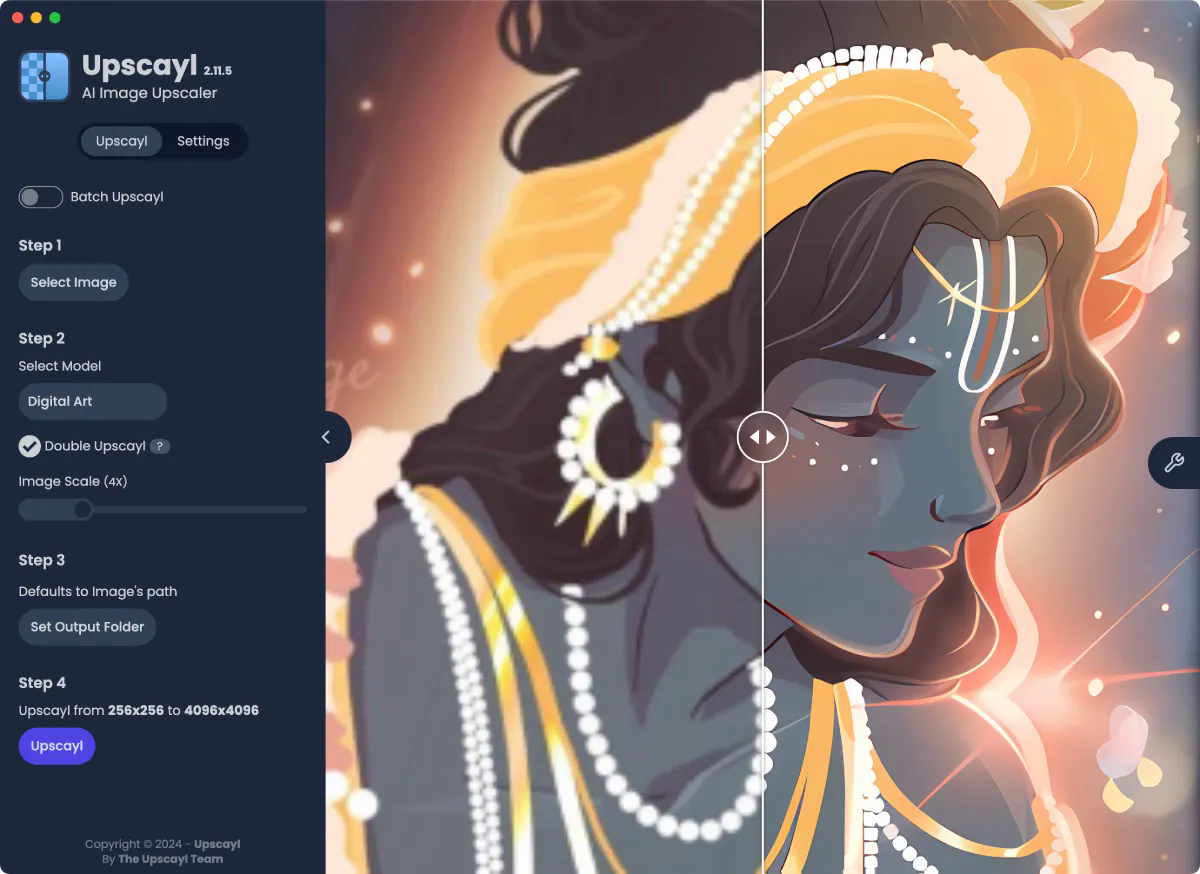
Upscayl is a local AI image-upscaler desk: you pick an image, pick a model (Digital Art), optionally Double Upscayl at 4X, and the desktop app is $0 (AGPL-3.0). Use it when the job is an upscale you start at a public $, not when you need Topaz Photo’s paid denoise/sharpen only.
Soft-note: Desktop free / OSS at github.com/upscayl/upscayl (Linux / macOS / Windows) + Upscayl Cloud Free Trial $0 (10 credits) + Pro Plan $24.99/mo (300 credits/mo). Distinct from Topaz Photo, Cleanup.pictures, and Midjourney.
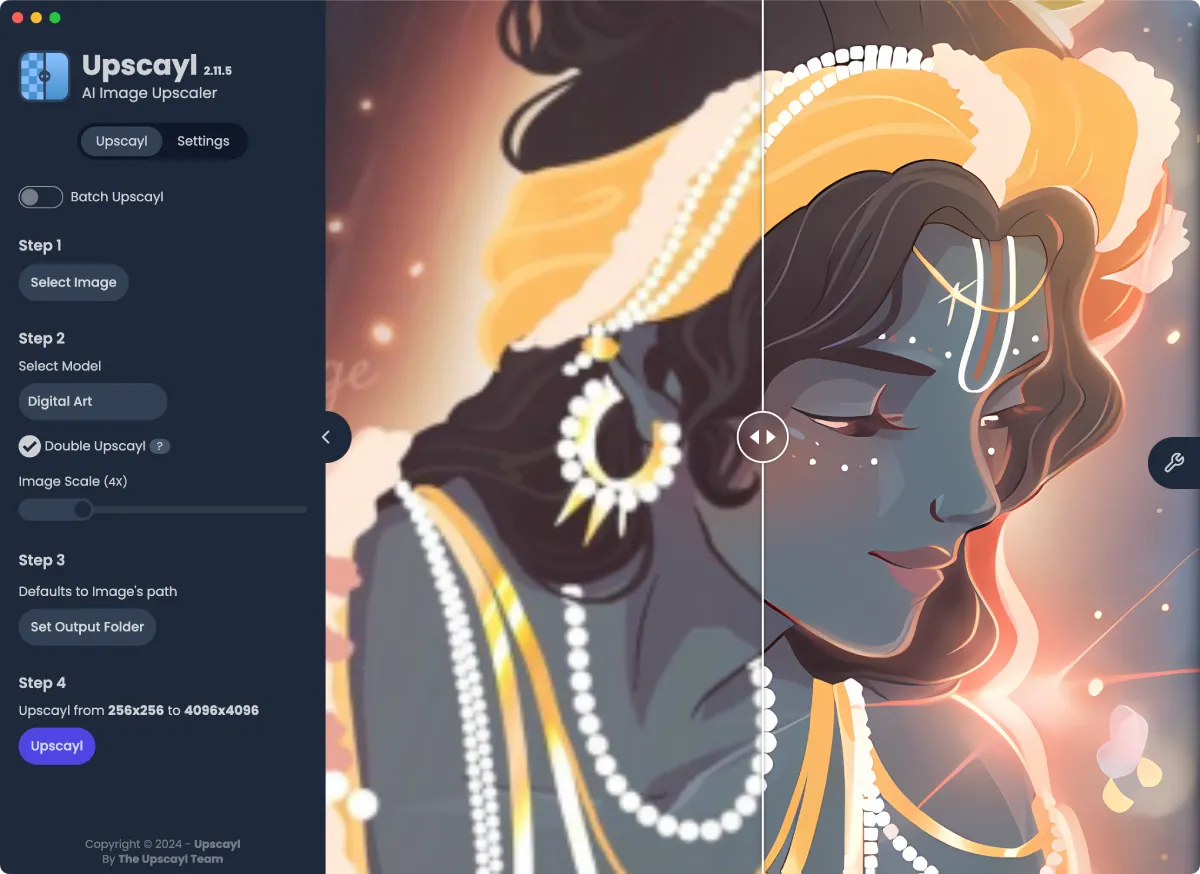
What makes it unique: the cover is Upscayl’s official desktop app (Upscayl 2.11.5, Batch Upscayl, Step 1 Select Image, Step 2 Digital Art, checked Double Upscayl, Image Scale (4X), Step 3 Set Output Folder, Step 4 256×256 → 4096×4096, split Krishna still) from the homepage desktop still — not a wordmark. The Digital Art model itself is ops of Select Model.
Digital Art (cover; docs). A model, not a Pro tile.256×256 → 4096×4096 (cover). A scale, not Get Started.Upscayl / Download / Login are CTAs (not desks). Free Trial / Pro $24.99 / credit packs stay in Pricing. Cloud Generate AI Images / face-enhancement marketing stay off Key features as AI extras.
Best fit: photographers and illustrators who will stay on Desktop at $0 (local GPU, AGPL-3.0) while they Double Upscayl a first Digital Art still, then Cloud Pro at $24.99/month when they need 300 credits/mo — not Business first unless they need a custom credit contract.
Verified 2026-10-23 (Asia/Shanghai) from upscayl.org/pricing plus upscayl.org / download and github.com/upscayl/upscayl. Soft-note: the Cloud page prints Free Trial $0 and Pro Plan $24.99; Desktop is a separate $0 OSS binary.
Confirm checkout; Cloud credits are not the Desktop $0.
Digital Art pass.Official Upscayl channel video: Upscayl Tutorial - How to use Upscayl? | Best Free AI Image Upscaler for Linux, Mac and Windows (oEmbed author: Upscayl). First-party how-to (models, Double Upscayl, Settings); the desktop Digital Art still is the cover. We also resolved Upscayl - AI Image Upscaler (ln_vBq-T7ag) and Upscayl - Free and Open Source AI Image Upscaler (SZg5aZvTjeo) on the same channel. We searched @upscayl (200; channel UCv-O18ZZ4RbGPC4dHcjy1Pg) and @UpscaylApp (404).
Written path: upscayl.org/pricing plus docs, download, and github.com/upscayl/upscayl.
Catalog row curated for AI Tools Nav. Cover is Upscayl’s official desktop app still (2.11.5 + Digital Art + Double Upscayl + 256×256→4096×4096 split Krishna) from upscayl.org/home/desktop-screenshot-2.webp. Dollars checked on upscayl.org/pricing (Desktop $0 OSS; Cloud Free Trial $0 / 10 credits; Pro $24.99/mo / 300 credits; one-time pack $ not in static HTML; Business custom). Tutorial oEmbed author: Upscayl (@upscayl; @UpscaylApp 404). GitHub: upscayl/upscayl (AGPL-3.0).
2026-10-23 (Asia/Shanghai) editorial check.