Newsletter
Join the Community
Subscribe to our newsletter for the latest news and updates
Open broadcast/recording
Best for streamers and recordists who will stay on the GPL app at $0 while they learn Preview → Transition → Program…
Verified 23 Oct 2026 · Asia/Shanghai
Pricing. OBS Studio — Free ($0).
Decide
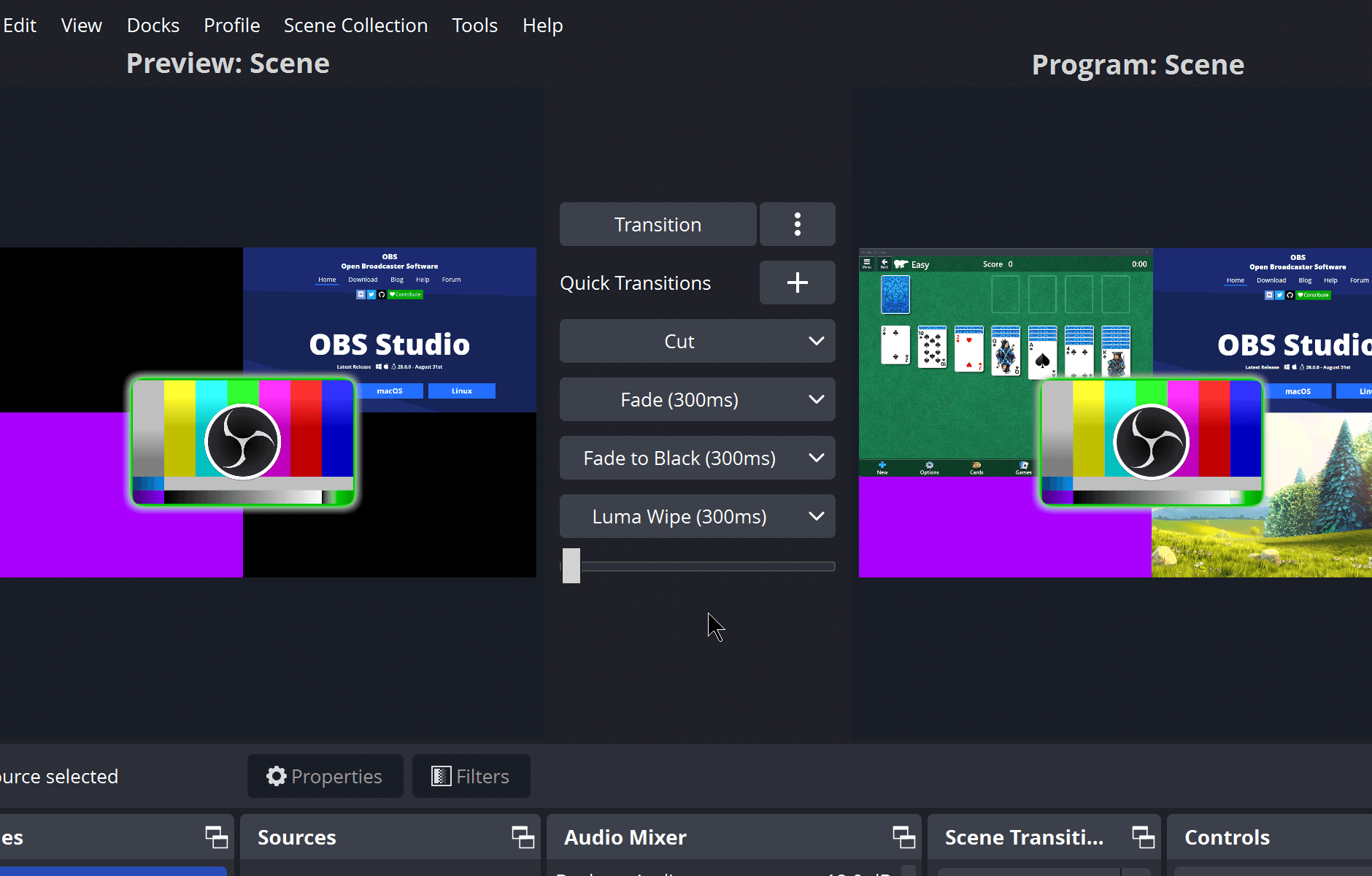
Full notes belowOBS Studio is an open broadcast and recording desk: you put Preview on the left and Program on the right, and the app is Free. Use it when the job is a live scene you start at $0, not when you need Screen Studio’s auto-zoom export only.
Soft-note: $0 — GPL desktop app; no hosted seat. Distinct from Screen Studio, Loom, and Tella.
What makes it unique: the cover is OBS’s official Studio Mode (Preview: Scene / Program: Scene, color-bar + OBS mark on both canvases, Transition / Quick Transitions +, Cut / Fade (300ms) / Fade to Black (300ms) / Luma Wipe (300ms), docks Sources / Audio Mixer / Scene Transitions / Controls) — not a wordmark. The Fade (300ms) row itself is ops of Transitions.
Download / Start Streaming buttons are CTAs (not extra desks). There is no paid tile to park in Pricing beyond $0.
Best fit: streamers and recordists who will stay on the GPL app at $0 while they learn Preview → Transition → Program — not a SaaS recorder unless they want Screen Studio’s auto zooms or Loom’s async bubble.
Verified 2026-10-23 (Asia/Shanghai) from obsproject.com and obsproject/obs-studio. Soft-note: there is no paid OBS Cloud card.
Confirm the build you download is from obsproject.com (or the GitHub releases), not a reskin.
Official OBS Project channel. We searched @OBSProject and @obsproject. The outdated-guide “OBS Studio Video Tutorial (beginner)” points at playlist PLT3Ure7_kYHwj8oT3AV-pZ4_r7yp6mDg-; the first video oEmbed author is NerdOrDie, not OBS Project, so we do not embed it as first-party. Use the written Quick Start and Studio Mode instead, and the official channel for project videos.
Written path: obsproject.com plus github.com/obsproject/obs-studio.
Catalog row curated for AI Tools Nav. Cover is OBS Studio Mode (Preview / Program + Cut / Fade / Luma Wipe). Dollars: Free $0 GPL on obsproject.com. Official YouTube: @OBSProject (no first-party Studio Mode how-to oEmbed; beginner playlist is NerdOrDie).
2026-10-23 (Asia/Shanghai) editorial check.