Newsletter
Join the Community
Subscribe to our newsletter for the latest news and updates
Real-time 3D design for the web
Best for web designers who will stay on Free at $0 (watermarked web exports) while they publish a first scene, then…
Verified 23 Oct 2026 · Asia/Shanghai
Pricing. Free — $0.
Decide
Full notes belowNew to Spline? Watch This First! An Introduction to Spline 3D | Beginners Tutorial — official Spline channel. Official Spline 3D beginners tutorial; 3D editor canvas still is the cover.
Spline is a real-time 3D (and Hana 2D) design desk for the web: you open the editor on a balloon “design” word, and Free is $0. Use it when the job is an interactive 3D scene you start at a public $, not when you need Runway’s video timeline only.
Soft-note: Free $0 + Hobby $12/mo billed yearly ($15 monthly) + Pro $25/mo billed yearly ($30 monthly). Max / Enterprise exist. Distinct from Runway, Midjourney, and Leonardo.
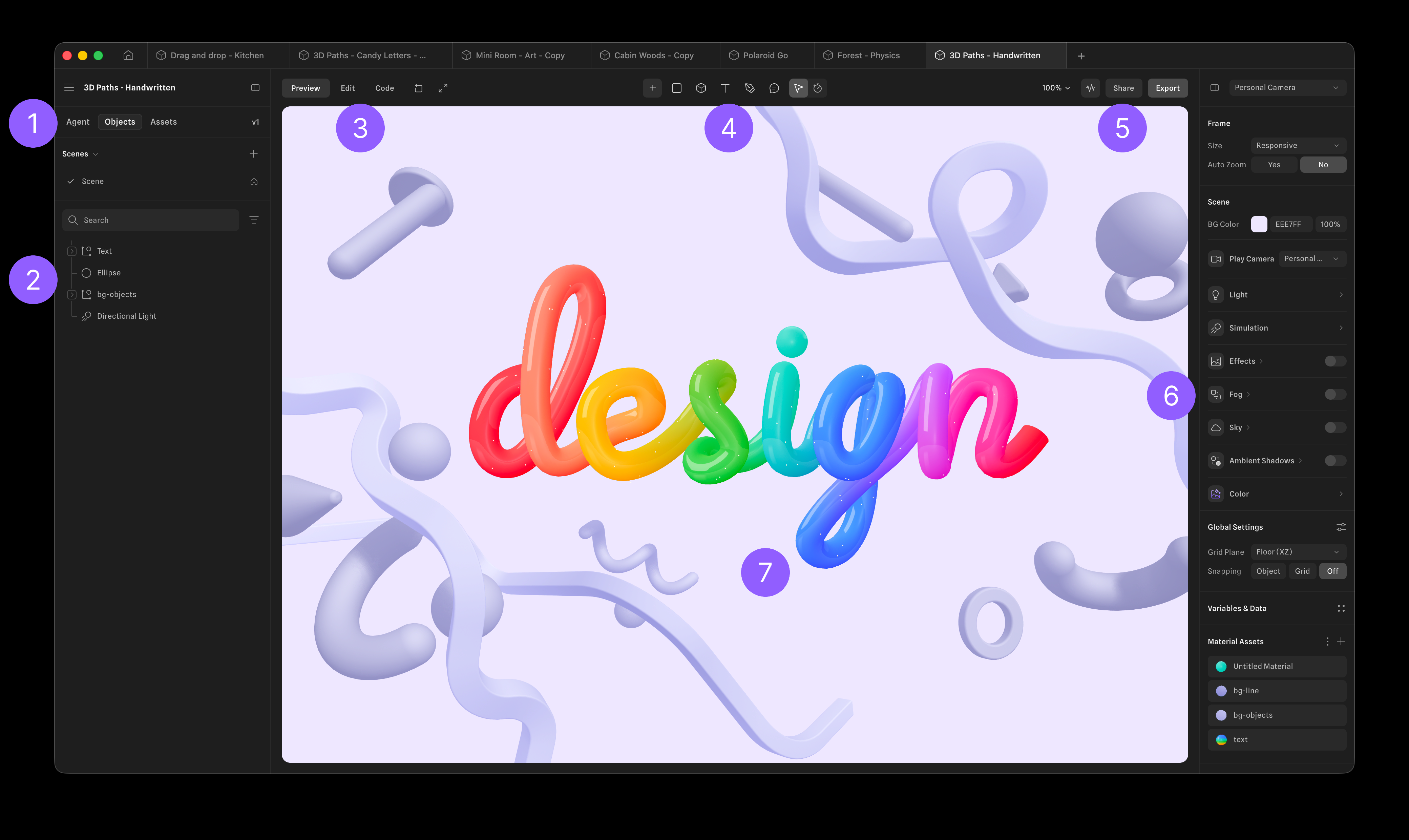
What makes it unique: the cover is Spline’s official 3D editor (3D Paths-Handwritten, Objects / Assets, Preview / Edit / Code, balloon rainbow design word, Personal camera + lighting rail) from the Understanding Spline’s UI docs still — not the dark cube wordmark. The design word itself is ops of the canvas.
design word (cover still; docs UI). One desk. Cover design sits here.Get Hobby / Start creating are CTAs (not desks). Hobby / Pro / Max tiles stay in Pricing. Spline AI agent / generate-3D stay off Key features as AI extras.
Best fit: web designers who will stay on Free at $0 (watermarked web exports) while they publish a first scene, then Hobby at $12/month yearly when they need no watermark and higher-res exports — not Pro $25 first unless they need the Pro library / MCP quota.
Verified 2026-10-23 (Asia/Shanghai) from spline.design/pricing. Soft-note: cards print yearly $ with monthly $ beside them.
Confirm checkout; AI credits are metered on paid cards.
design canvas.Official Spline channel video: New to Spline? Watch This First! An Introduction to Spline 3D | Beginners Tutorial (oEmbed author: Spline). First-party beginners how-to; the 3D editor canvas still is the cover. Academy also lists it as Get Started with 3D in Spline. We searched @splinetool (200; product) and @spline (200; a different “Spline splinson” channel).
Written path: spline.design/pricing plus Understanding Spline’s UI.
Catalog row curated for AI Tools Nav. Cover is Spline’s official 3D editor (balloon design word + Objects/Assets + Preview/Edit/Code) from docs. Dollars checked on spline.design/pricing (Free $0; Hobby $12/mo yearly / $15 monthly; Pro $25/mo yearly / $30 monthly). Tutorial oEmbed author: Spline (@splinetool; @spline is a different channel). No official product GitHub.
2026-10-23 (Asia/Shanghai) editorial check.